English
 Español
 Deutsch
Warm evenings, kitchen windows, and balcony doors tend to bring flying insects, and an electric bug swatter is the tool people reach for. It collects dust, damp air, and insect residue along the way, so its condition shifts with use. A little cleaning and sensible storage keep it ready for the next time.
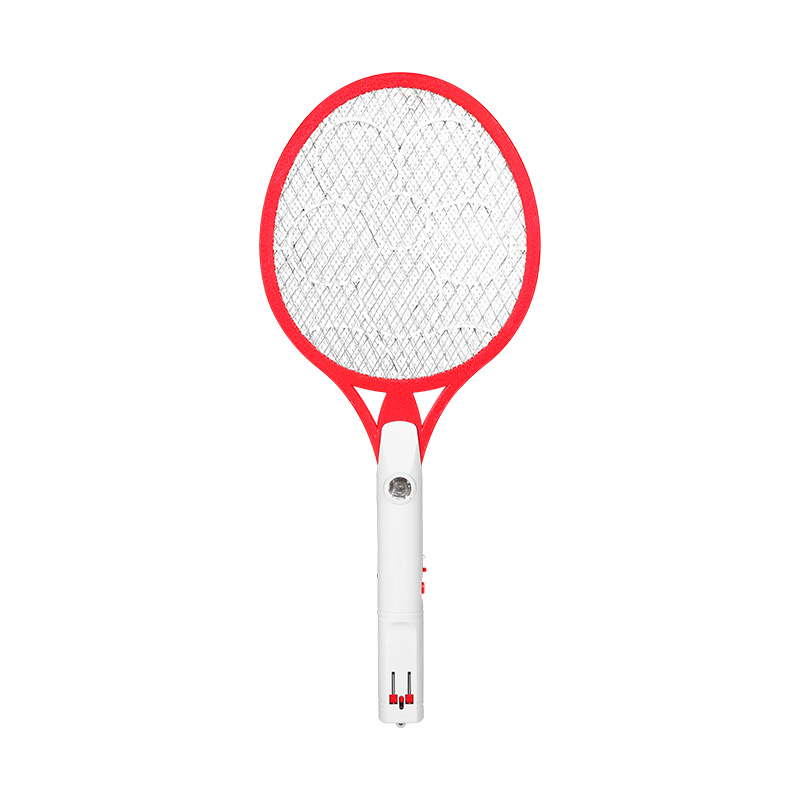
An Electric Mosquito Racket is built from a handheld frame, an electrified mesh, a handle, and an internal power system. Because each part does a different job, upkeep has to cover the whole product. Residue on the mesh can reduce its ability to catch insects, and rough handling strains the frame and the electrical parts. An LED Mosquito Racket adds a light source, which, depending on the design, may draw insects or help users find the racket in a dim room.
Maintenance does not call for special equipment. It means clearing residue safely, keeping the product dry, looking for visible damage, and choosing a suitable place to store it. Once these habits are clear, users can avoid common problems and care for the product with more confidence.
Why Does Regular Cleaning Matter for an Electric Bug Swatter?
Insects get caught between the metal mesh layers, and small particles stick to the surface. Household dust also settles around the frame, the handle, and the protective areas. Left alone for weeks, this buildup becomes harder to remove and may disturb normal use.
The mesh does the real work in a swatter. Insect remains packed between the wires make the surface difficult to reach, and loose debris can hide bent or broken sections. A clear surface makes it easier to judge the condition of the mesh.
Handles collect sweat, skin oils, and grime from daily contact. Over time the grip can feel unpleasant or slippery. Wiping the exterior keeps it comfortable to hold.
A clean racket also reveals changes sooner. A bent frame, loose connection, damaged switch, or strange mark is easy to overlook under a layer of dirt. Take these signs seriously, especially when they involve electrical or protective parts.
How Should the Mesh Be Cleaned Without Causing Damage?
Since the mesh belongs to the electrical system, handle it carefully. Switch the racket off and unplug it from any charging source before you start. Follow the manufacturer's instructions for safely discharging or deactivating the product before touching the mesh. Where no safe-cleaning method is given, leave the internal mesh alone.
A soft, dry brush clears loose dust and insect residue from areas you can reach. Light strokes work better than pressing or scraping. Stiff bristles, sharp tools, or rough pads can bend the wires or harm the protective structure.
Residue sometimes dries hard between the mesh layers. Do not push tools into tight gaps or pull at stuck material. If debris refuses to come out without pressure, read the product instructions or ask a qualified person.
Keep water away from the mesh, whether poured or sprayed. A switched-off racket can still hold moisture in hidden spots, and that creates an electrical risk when it is used again. The mesh should stay dry from start to finish.
A simple cleaning routine can include the following actions:
- Turn off the racket and disconnect it from its charging source.
- Follow the manufacturer's safety instructions before touching the product.
- Use a soft, dry brush to remove loose debris from accessible areas.
- Avoid bending, scraping, or pressing the mesh.
- Stop if residue cannot be removed safely.
- Inspect the surface for visible damage before returning the racket to storage.
The point is to lift loose material while leaving the mesh in its original shape. A gentle approach suits the product better than chasing every tiny mark.
Which Parts Need Attention Besides the Mesh?
People tend to focus on the mesh, but other parts affect the racket just as much. The outer frame shields the working area and keeps the racket in shape. Dust builds up along its edges, and repeated knocks may crack it or loosen a section.
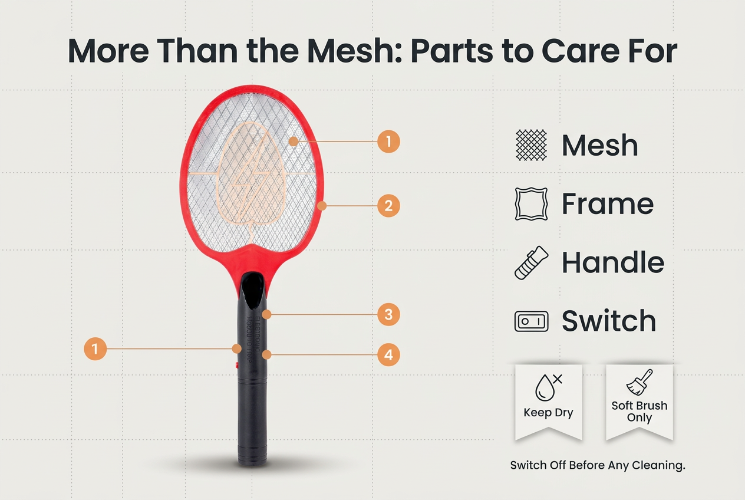
The handle needs regular care too. A lightly dampened cloth can suit some exterior surfaces, though the manufacturer's instructions should be checked before using any cleaning liquid. Wring the cloth out well so no moisture reaches the switch, charging port, or other openings.
The power switch should stay clean and free of sticky film. If it gets hard to press, do not force it or open the handle. Odd switch behavior can point to a fault that needs professional attention.
Look at the charging port and cable connection as well. Dust inside a port can weaken contact, and moisture or visible corrosion means the racket should not be charged. Never push metal objects into the port, and use a dry, soft brush on loose exterior dust only if the manufacturer's guidance permits it.
On an LED Mosquito Racket, the light area deserves the same gentle treatment. Dust on the cover dims the glow, and pressure or harsh cleaners can scratch it. Wipe accessible exterior areas with a soft cloth and keep the light assembly closed.
How Can Moisture and Heat Affect Product Condition?
Damp conditions are a familiar threat to household electrical products. A swatter often sits near kitchens, windows, balconies, or outdoor seating, where steam, rain, splashes, and humid air are common.
Water that gets into the handle or internal structure can damage electrical components. The outside may seem dry while moisture lingers inside. Do not switch on or charge a wet racket right away. Follow the manufacturer's guidance on inspection and drying, and if water has entered, seek qualified service instead of relying on surface drying.
Heat is another concern. A racket left in strong sunlight, in a hot car, or next to a cooking appliance sits in conditions its materials were not meant for. Repeated exposure can harm plastic parts and the power system.
An indoor spot with steady conditions reduces these risks. Keep the racket clear of sinks, wet countertops, heaters, and windows that let rain in. Outdoors, avoid resting it on damp ground or leaving it in changing weather.
Humidity matters even without direct contact with water. A dry storage area at normal room conditions limits moisture exposure. After use in a humid place, inspect the racket and let accessible exterior surfaces dry as the instructions describe before putting it away.
What Maintenance Habits Help Protect the Battery and Charging System?
A rechargeable swatter depends on a power system that rewards sensible handling. Charging routine, storage conditions, and cable treatment all influence it over time. The supplied instructions should guide you, since charging needs differ between designs.
Pair the racket with a compatible cable and power source. An unsuitable charger may not match the electrical needs of the product. Do not force a connector into the port or pull the cable at an angle, because both strain the connection.
Charge in a dry, ventilated area, away from water, heat sources, and anything that blocks airflow. A racket showing swelling, unusual heat, a damaged port, or a burning smell should not be charged. Stop using it and arrange an inspection.
Avoid leaving the battery on charge unattended for long periods unless the manufacturer allows it. When charging finishes, disconnect as directed, and do not plug and unplug the cable without good reason.
If the racket will stay unused for a long time, read the storage advice from the manufacturer. Some rechargeable products need occasional attention during long storage, and others do not. Guessing at a routine invites trouble, so product-specific instructions are more useful than a general rule.
Does an LED Mosquito Racket Need Different Care?
An LED Mosquito Racket has a light component next to the electric mesh. Upkeep therefore covers the light area along with the usual racket parts. Designs differ, but the principles stay the same: keep surfaces clean, avoid moisture, and never open electrical assemblies without suitable knowledge.
Dust on the light cover changes how clearly the light shows. A soft, dry cloth removes surface dust without putting pressure on the component. If the cover has a removable protective piece, take it off only when the manufacturer explains how to do so safely.
Check the light during routine inspection. Flickering, failure to switch on, or visible damage can signal a problem in the light assembly or the power system. Pressing the switch harder or reconnecting the charger over and over will not solve it.
Keep the light area free of stickers, thick coverings, or objects that block it. These alter how the light is seen and may leave adhesive residue.
An LED feature does not replace care for the mesh, handle, frame, and battery. Looking after the racket as one complete product keeps routine care simple and lowers the chance of missing hidden parts.
How Should an Electric Bug Swatter Be Stored Between Uses?
Storage shapes how well a racket copes with daily wear. A crowded countertop, or a heavy item placed on top, presses on the frame and mesh. A good spot protects the product from impact, moisture, dust, and accidental activation.
A dry cabinet or a set shelf offers more control than an open work surface. Keep the racket out of children's reach and away from places where pets could knock it down. If a cover or holder comes with it, use it as the manufacturer describes.
Before storing it, make sure the racket is switched off. Check that the mesh and accessible exterior surfaces are free of loose debris and moisture. Do not leave it plugged into a charger unless the instructions say that is acceptable.
Position matters too. Keep heavy objects off the mesh, and do not bend the handle to fit the racket into a cramped space. A spot where it rests without pressure helps it hold its shape.
On trips, carry the racket in a protective case or a separate compartment so other belongings cannot crush it. Keep charging accessories tidy and stop loose items from rubbing the mesh or light cover. Inspect the racket for cracks, loose parts, or other visible changes before using it after travel.
What Warning Signs Should Users Check During Routine Maintenance?
Cleaning is also a chance to inspect. Some problems appear before they disturb normal operation. Spotting them lets users stop using a damaged racket rather than carrying on.
| Part | Signs to Look For | Recommended Response |
|---|---|---|
| Mesh | Bent wires, broken sections, or loose areas | Stop using the product and seek suitable service |
| Frame | Cracks, deformation, or loose joints | Avoid applying pressure and arrange an inspection |
| Handle | Unusual movement, cracks, or sticky residue | Clean accessible surfaces and check for structural damage |
| Switch | Sticking, inconsistent response, or visible damage | Stop operating it and consult the manufacturer |
| Charging port | Moisture, corrosion, or a loose connection | Do not charge until the issue has been checked |
| LED area | Cracked cover, flickering, or failure to light | Follow the product's inspection and service instructions |
Never patch a damaged mesh with household glue, wire, or makeshift materials. Altering the mesh structure can affect electrical safety. Opening the handle to adjust internal wiring is risky as well and may make the product unfit for further use.
Treat strange smells, sudden heat, sparks, or abnormal sounds as warnings. Switch the product off if that is safe, stop charging, and follow the manufacturer's advice. A racket that looks damaged should not be tested again.
Ordinary household use does not need a maintenance log. Still, noting when a problem began helps when you contact a supplier or service provider. A clear description of the symptom is worth more than an unapproved repair.
For manufacturers and suppliers, maintenance guidance forms part of product support. Clear notes on cleaning, charging, storage, and warning signs help users look after an Electric Mosquito Racket through regular use. Thoughtful design, protective structures, accessible cleaning areas, and readable instructions make ownership easier.